A back-to-school flow that works for teachers and Gynzy
After the summer, every teacher sets up their tools again. I turned that moment into a short, adaptive onboarding that creates value on both sides. Teachers get ready for the new school year faster: their classes are linked and duplicate accounts merged. Gynzy finally learns who its users are: we now know the grade of 74,000 teachers, and over 40,000 set their teaching method for the first time. The foundation for a more personal product. I also built most of the UI components myself, using AI.
Why the start of the school year matters
- After the summer break, teachers return to a new class, sometimes a new grade, and set up Gynzy for the rest of the year. It's the one moment where almost every teacher is open to configuring things.
- At the same time, what we knew about our users was often outdated or missing. Teachers often switch grades between school years, and only 6% of teachers had set their math method, 5% their spelling method.
- That made it hard to personalize the Start page, to target new features at the right teachers, and to trust our own data.
The goals
For teachers
- A Start page that fits: by choosing their grades, teachers see content on their Start page that matches the grades they teach
- Suggestions that match their method: by setting their math and spelling method, teachers get suggestions that fit the method they teach with
- All students and groups at once: with Basispoort connected, teachers instantly have access to all students and groups of their school. That makes it much easier to use the other tools in Gynzy
- One account: all their lessons in one place, instead of split across two accounts
- Light and skippable: the first weeks are busy, so every step is quick and can be skipped
For Gynzy
- Know our users: which grade teachers teach and which methods they use
- Reach the right teachers: approach teachers in a more personal way when we launch future features
- Better data: fewer duplicate accounts and more schools connected to Basispoort
The approach
We knew there was a lot to do before the start of the school year. So instead of starting with screens, I started with the question of who we were designing for.
Starting with data
- I mapped the segments within the product and looked at which indicators best predict activity in Gynzy
- Only 6% of teachers had set their math method and 5% their spelling method, after a whole school year of slow growth. Yet exactly that information is essential for personalizing Gynzy, now and in the future
- In the weeks before the school year starts, teachers already log in to set up all their systems again, Gynzy included. They have the time for it then. If they don't do it at that moment, chances are they never will
Choosing who to serve first
- We split users by role (administrator or not), whether they're connected to a school, and whether that school has a Basispoort link
- Teachers at a school with a Basispoort link turned out to be the most active, and they keep using Gynzy. That made them the most important group to reach
- Next came teachers who had set up a school, but no Basispoort link yet
- Teachers without a school were deliberately left out. The flow for adding a school already existed elsewhere, but not yet in Flutter, and we could still point them to it during the year
Where it got hard
- Designing the screens was the easy part. The real challenge was untangling all the segments, at the speed the start of the school year demanded
- Merging accounts took the most time. The flow also had to work in another part of the app, so it had to be set up in a scalable way
- The matching logic was tricky: teachers with the same email domain at the same school, or with the same first or last name. We had to tell them apart without leaking other people's accounts into the UI
- That flow came with lots of edge cases, and we had to course-correct several times along the way
The flow
Instead of a long form, I designed a series of short steps. Each one asks a single question, and the flow adapts to the teacher's situation: steps without anything to show drop out, and a school without a Basispoort link gets a different step than a school that already has one.
How the flow adapts to each teacher
Every step can be skipped. Steps without anything to show drop out automatically.
1. Merging duplicate accounts
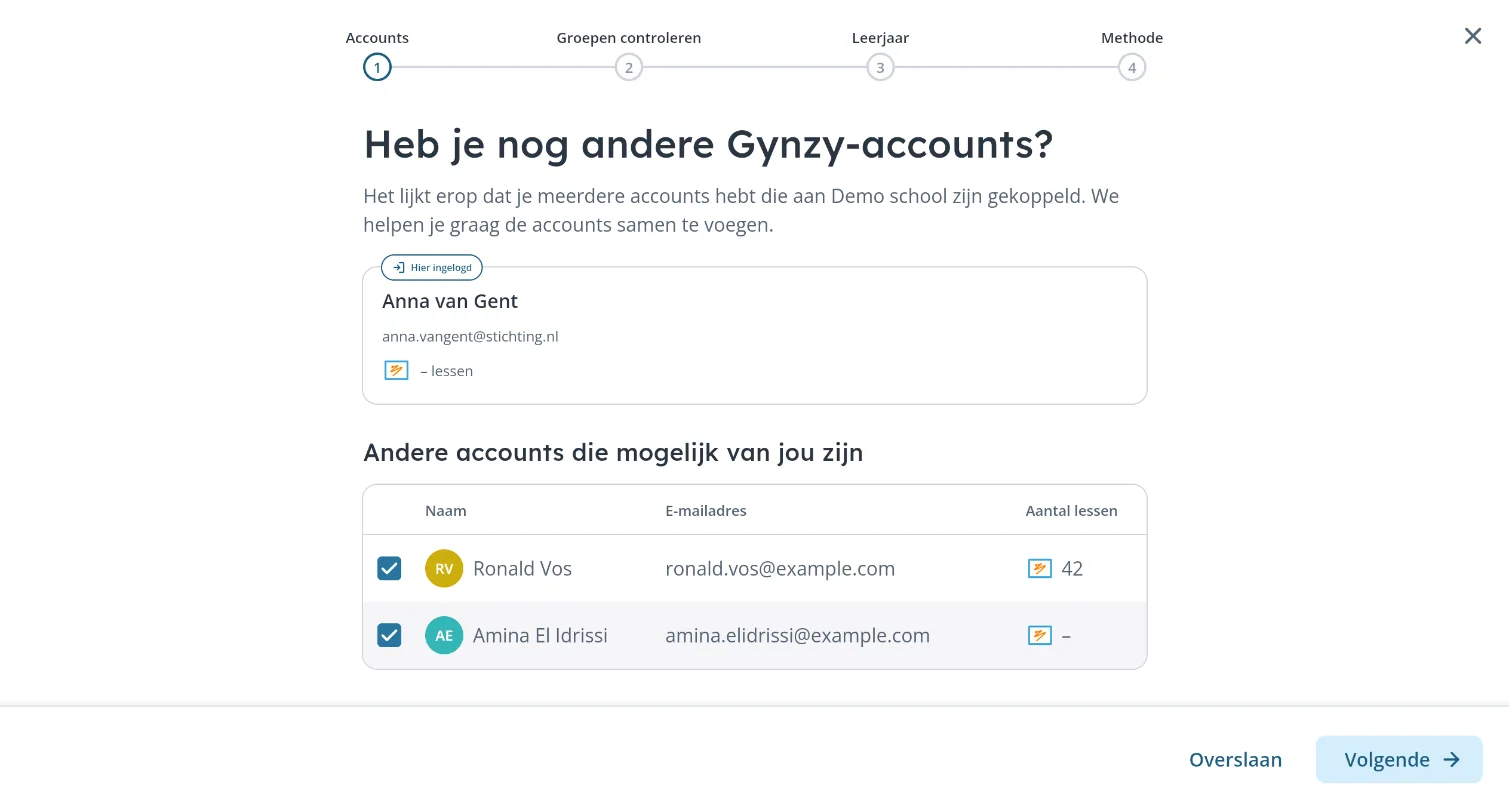
- Some teachers ended up with two accounts: one created by a sync, and one they had made themselves earlier. Their lessons and settings were split across both
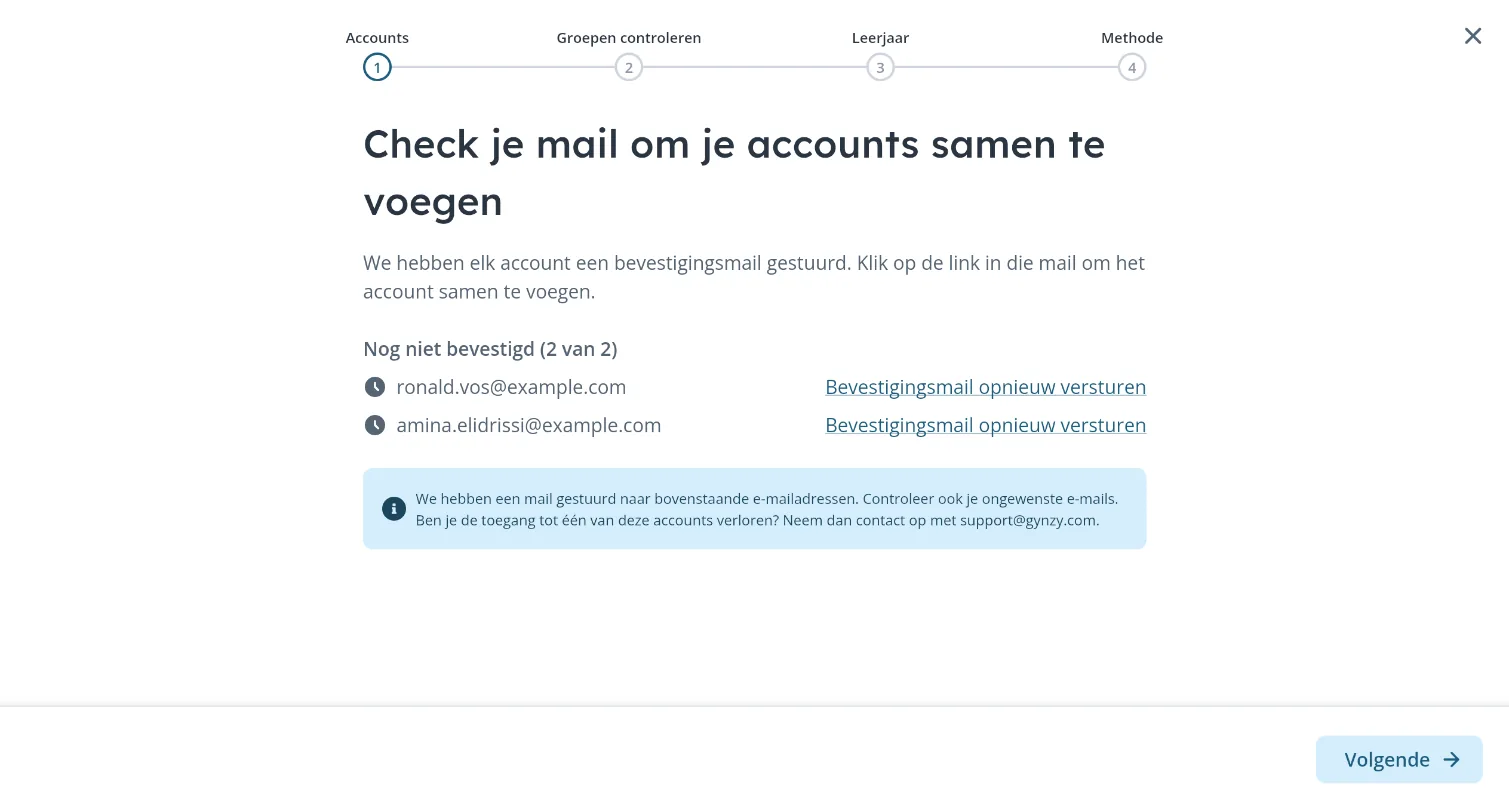
- When we detect possible duplicates, the flow shows them side by side, including how many lessons each account holds. The teacher picks which ones are theirs and confirms each one via email, so nobody can claim someone else's account
- For us, every merge means cleaner data and fewer support questions
A design that didn't make it
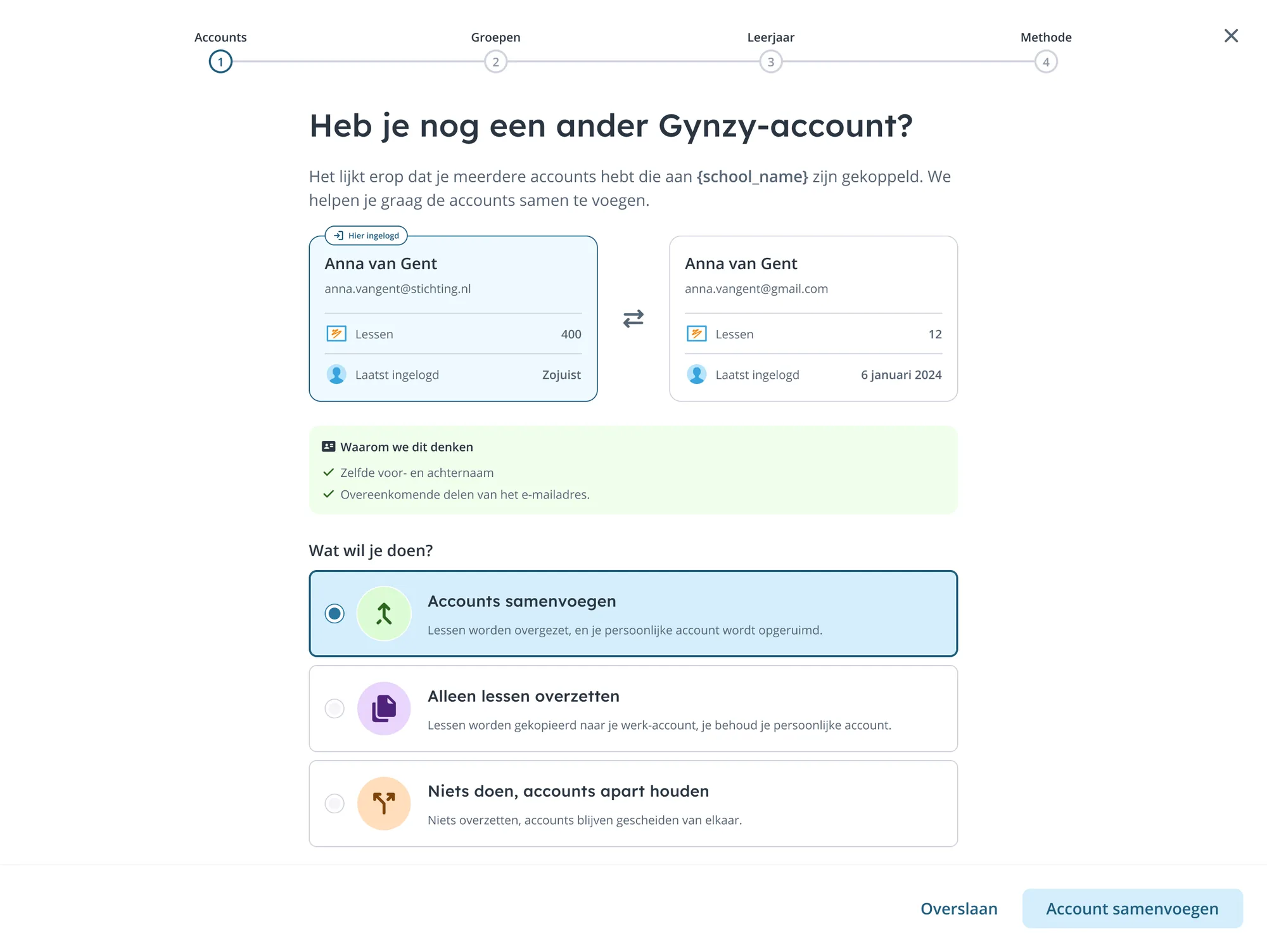
My first design put one other account side by side with the current one, explained why we thought they belonged together, and let teachers choose: merge, only copy lessons, or keep the accounts apart. Two things changed it. It turned out a teacher could have more than one account to merge, and to save time we decided to always move all lessons. That made the choice unnecessary, so the final version became a simpler list where teachers tick the accounts that are theirs.
2. Connecting Basispoort
Basispoort is the platform Dutch primary schools use to connect educational software to their student administration system. Once a school links Gynzy to Basispoort, classes, students and teachers are synced automatically, and everyone can sign in with a single account. Without that link, teachers have to create and maintain classes by hand, which leads to outdated groups and duplicate accounts.
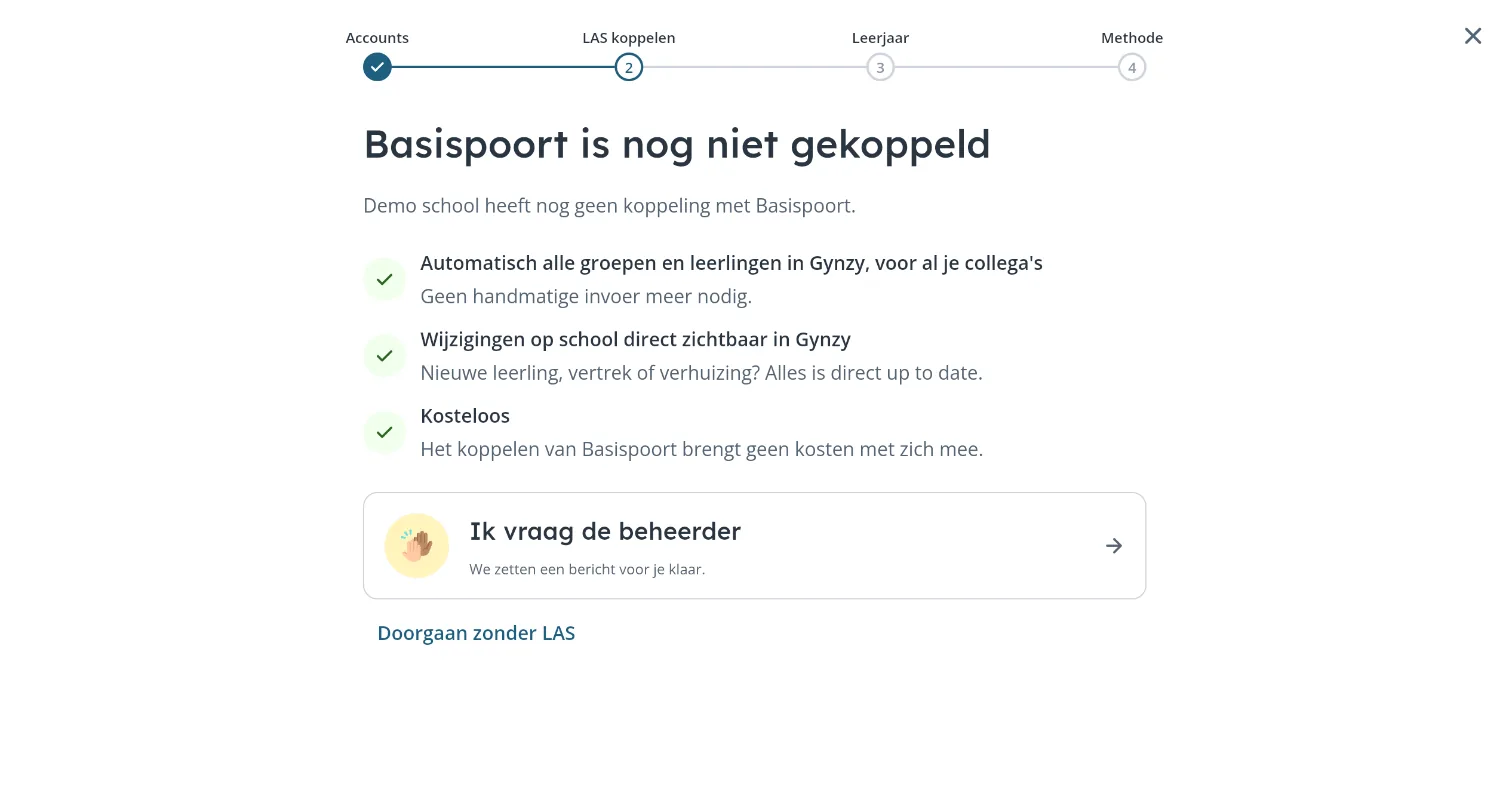
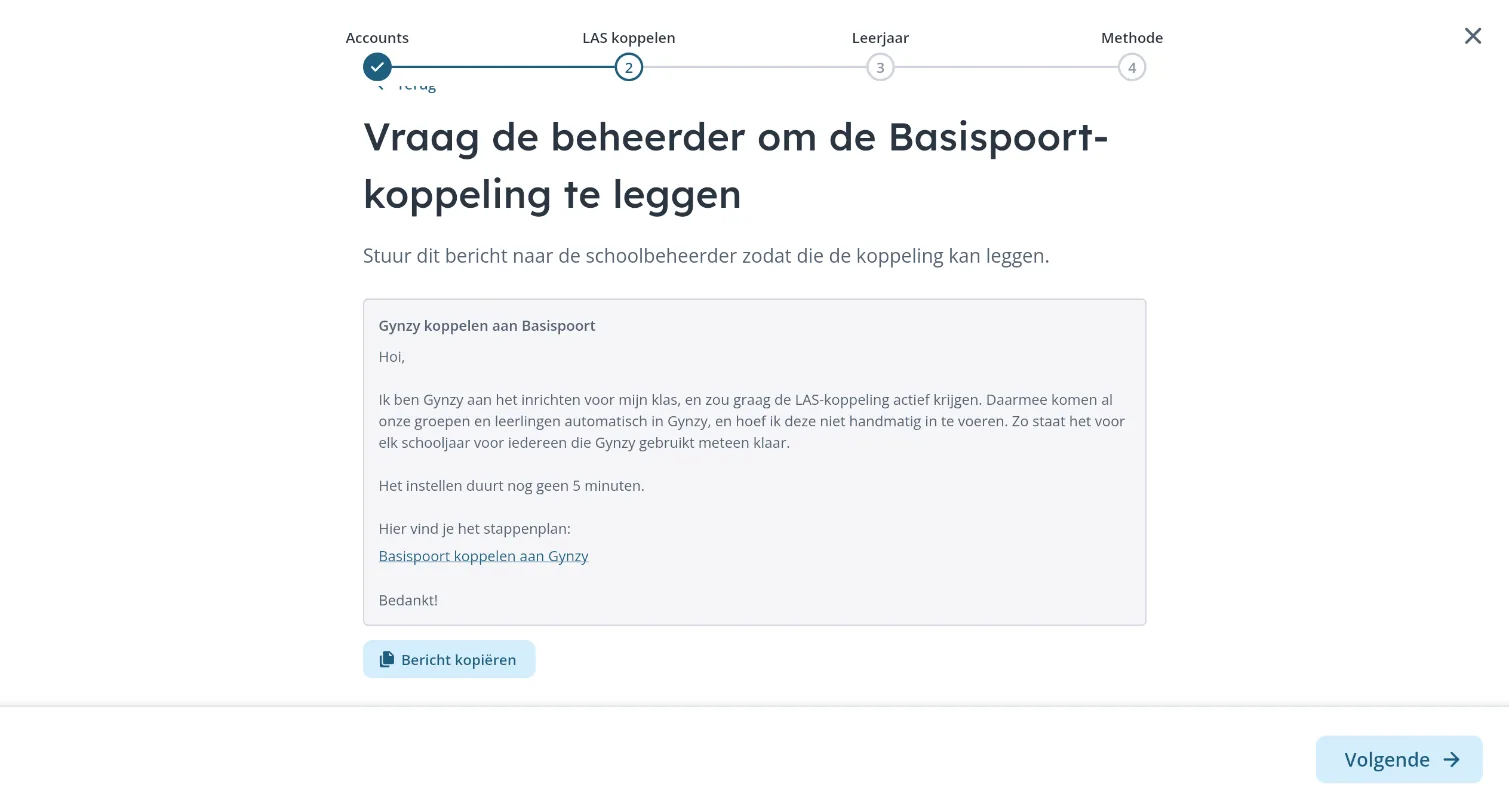
The catch: only a school administrator can set up the link. Most teachers aren't administrators, so the step had to work differently depending on who you are.
- Not linked yet? The step explains in three short points what the link brings: all groups and students in Gynzy automatically, changes visible right away, and no costs
- Administrators get a clear explanation of what the link brings them and are nudged to set it up right away
- Teachers without admin rights get a ready-made message for their administrator, explaining why and how to connect Basispoort, with a link to the step-by-step guide. One click copies it, so the teacher doesn't have to figure out what to write
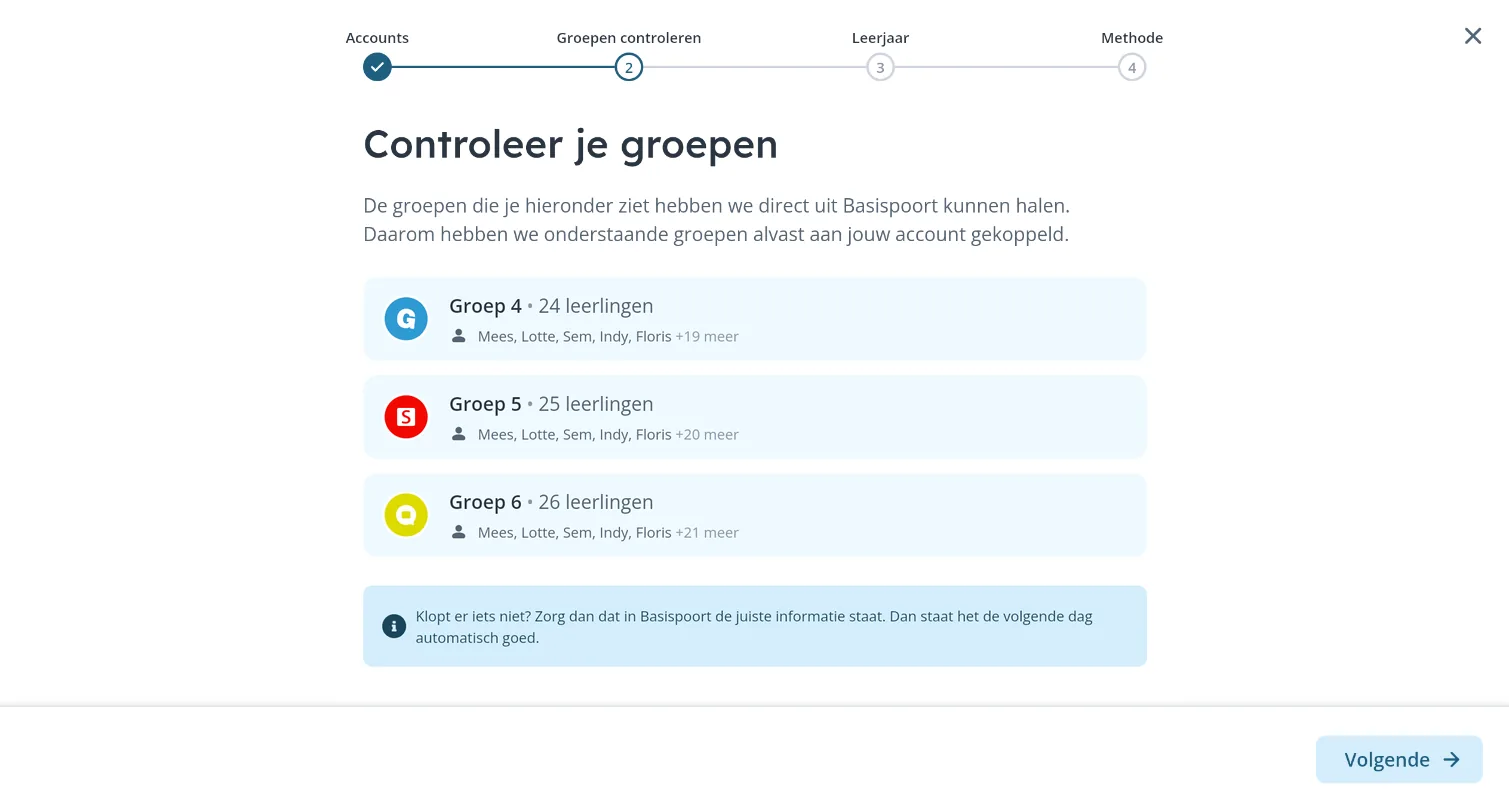
- Already linked? Then this step turns into a quick check of the groups we pulled in from Basispoort
3. Which grades do you teach this year?
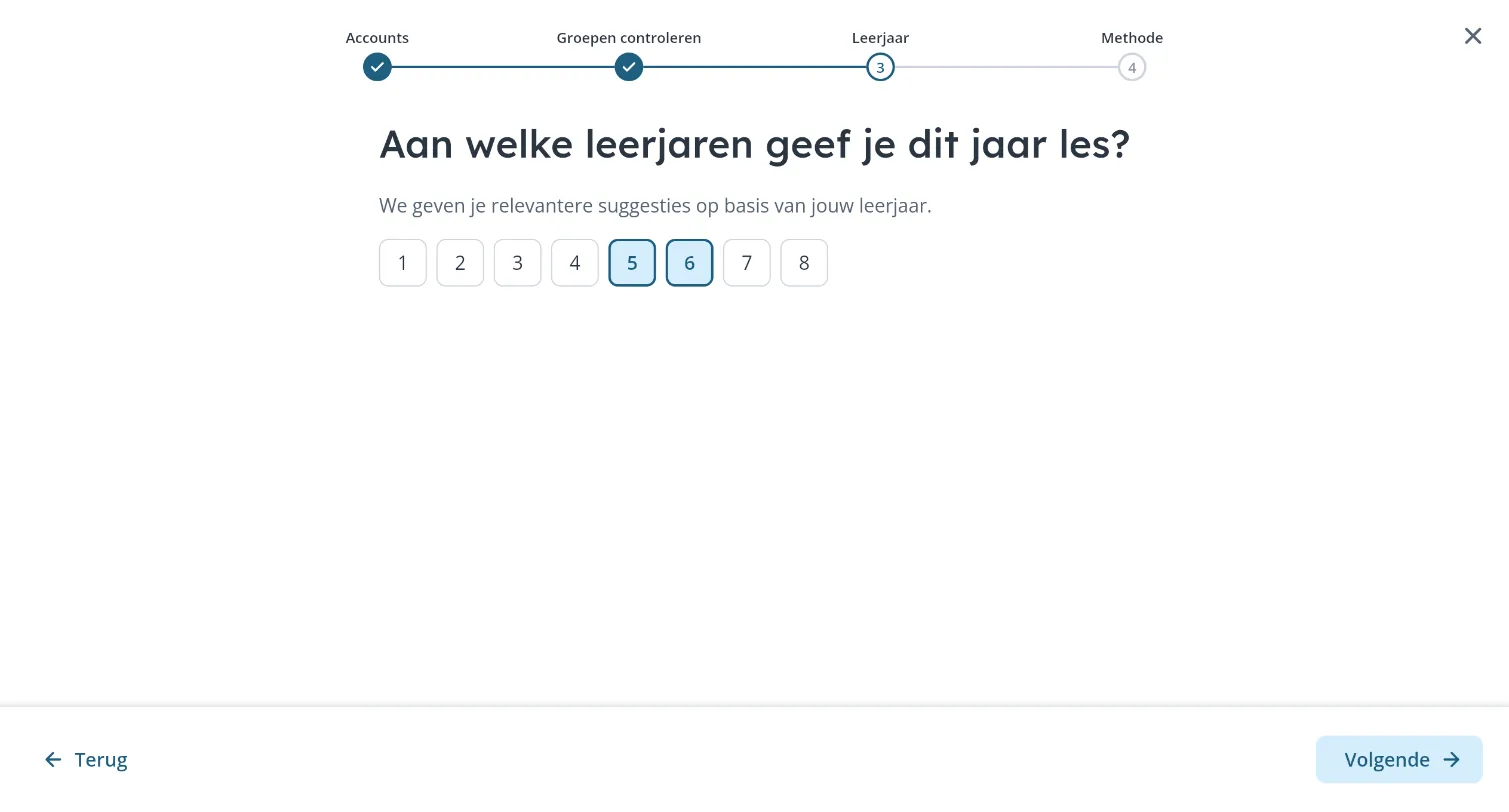
- Teachers often switch grades between school years, so we ask again every year instead of relying on old data
- The grade directly shapes which content we can highlight on the Start page
- Combination classes are common in Dutch schools, so teachers can pick more than one grade
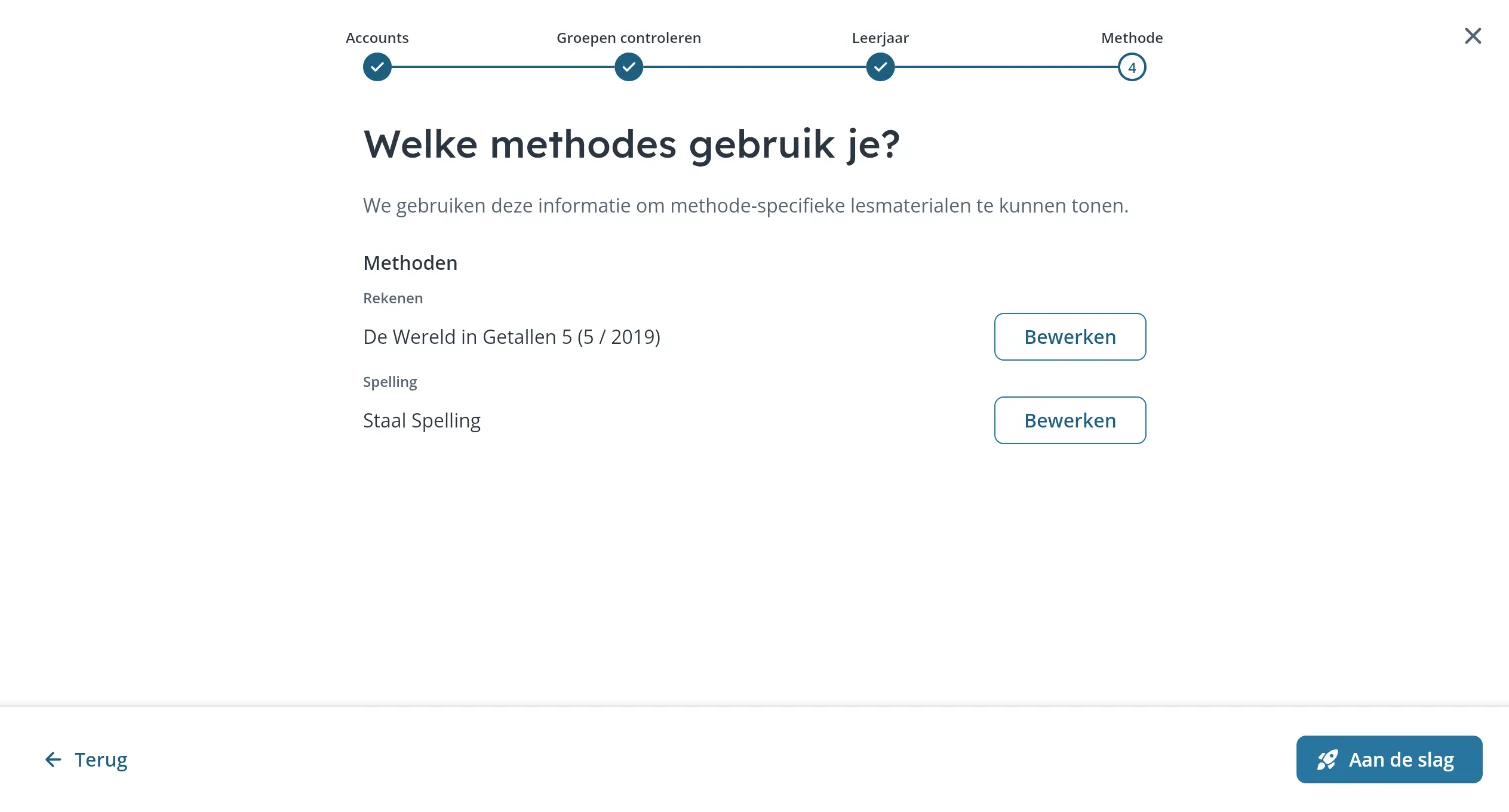
4. Which methods do you use for math and spelling?
- Dutch schools work with a variety of teaching methods. Knowing which one a teacher uses lets us align content and features with their daily lessons
- It also tells us which methods matter most to our users, valuable input for the product roadmap
Building the UI with AI
To take work off the development team's plate under that time pressure, I built almost all of the UI components I designed myself, using AI. Instead of handing over designs and waiting for implementation, I could take a component from design to working code and iterate on the real thing.
- Less back-and-forth between design and development, and more developer time for the logic behind the flow
- Design details ended up in the product as intended, because I built them
- It changed my role: from delivering screens to delivering working components
Results
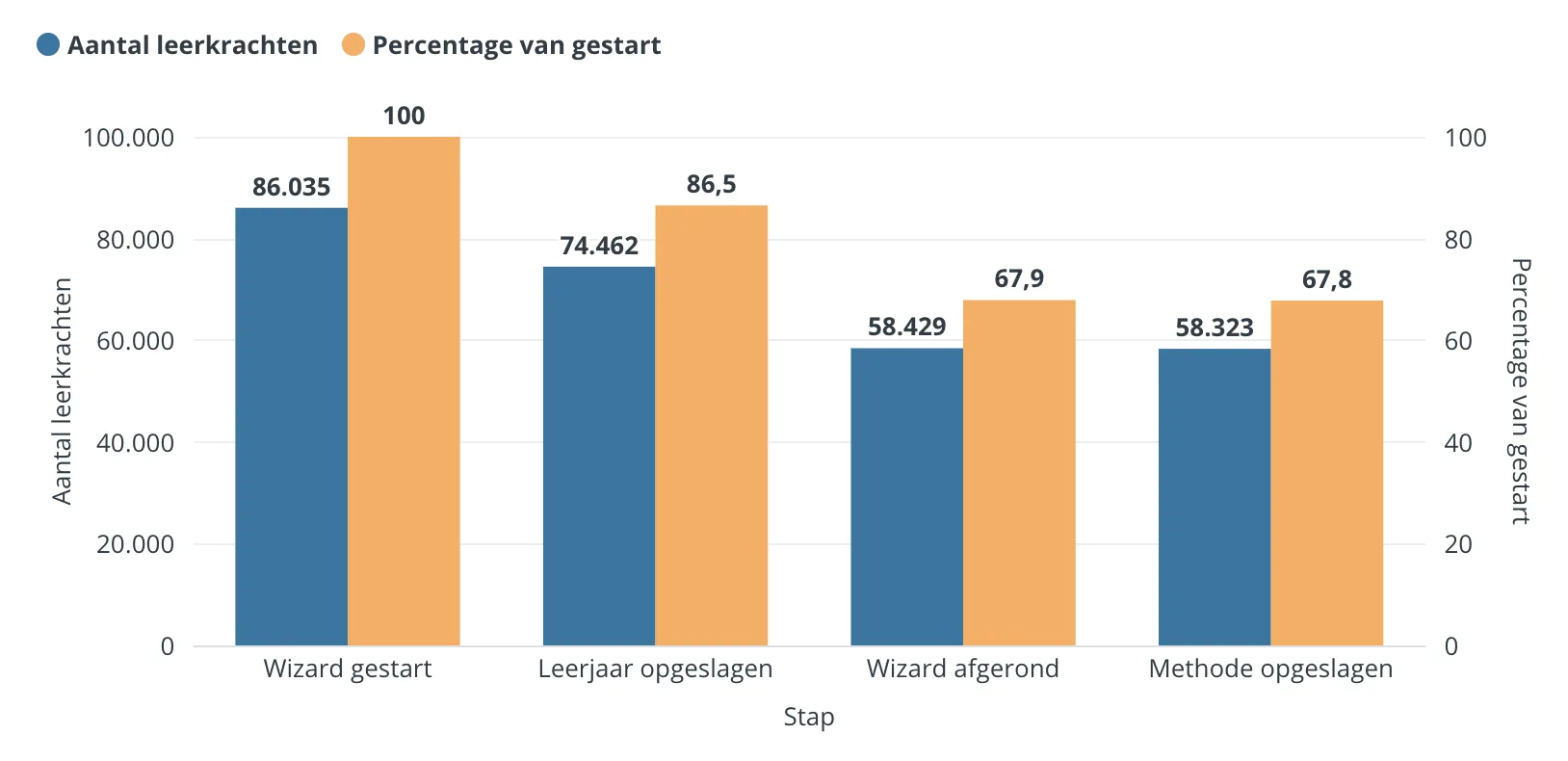
- In August and September 2026, more than 86,000 teachers started the onboarding.
- The share of teachers with a math method set went from 6% to 41% in six weeks, and spelling from 5% to 38%.
- Of the 74,000 teachers who saved their grade, 86% set it for the first time or changed it. Only 14% confirmed what was already there. Asking again at the start of every school year pays off.
- More than 58,000 teachers (68%) completed the full flow.
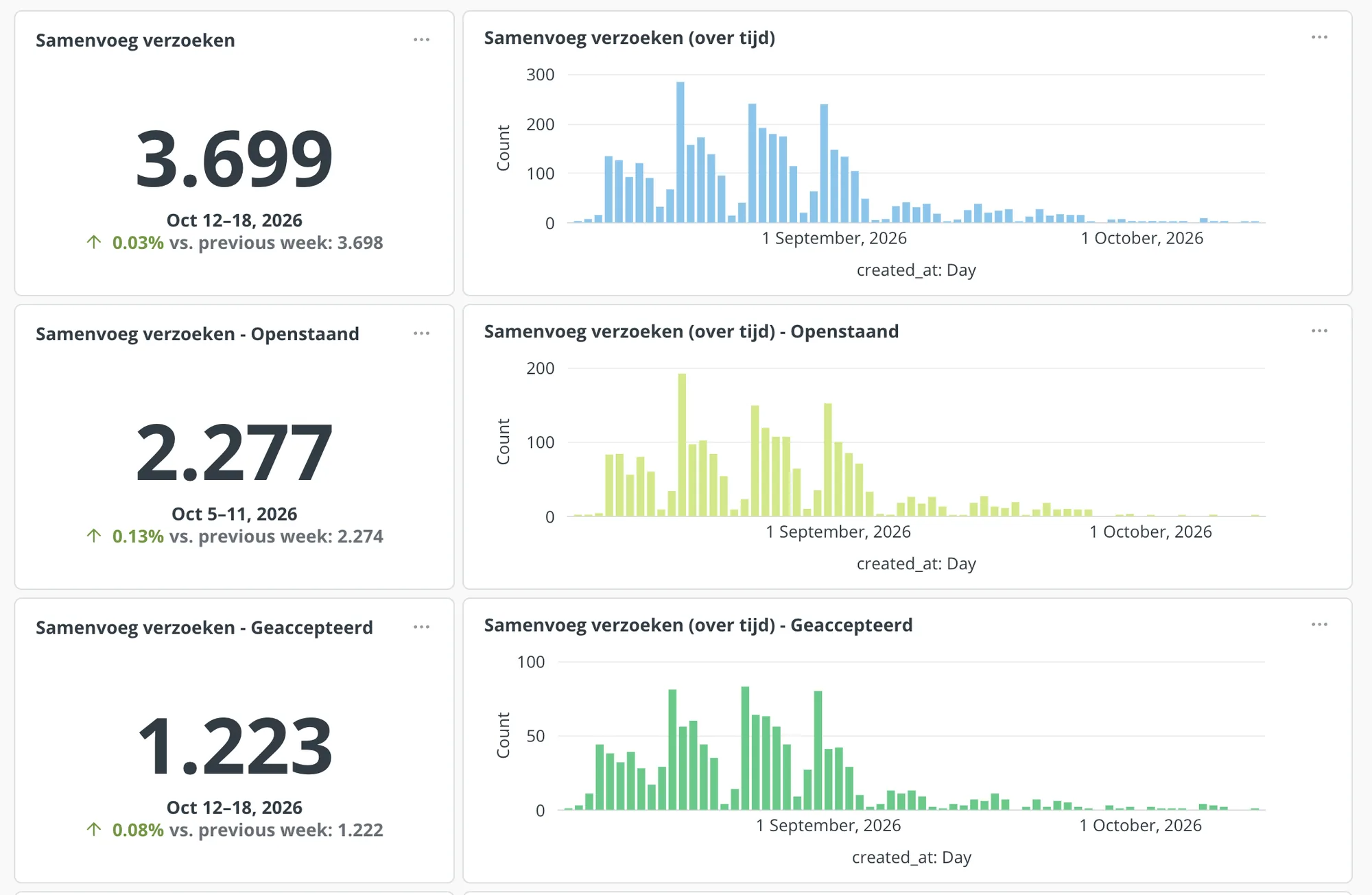
- Teachers sent almost 3,700 merge requests. More than 1,200 duplicate accounts have already been merged, and another 2,277 requests are waiting for email confirmation.
- The three peaks follow the staggered regional summer holidays: every time a region went back to school, thousands of teachers started the flow on the first days. Proof that the timing was right.
- The biggest drop-off happens after the grade step. That's exactly where the next iteration comes in: letting teachers finish later from their Start page.
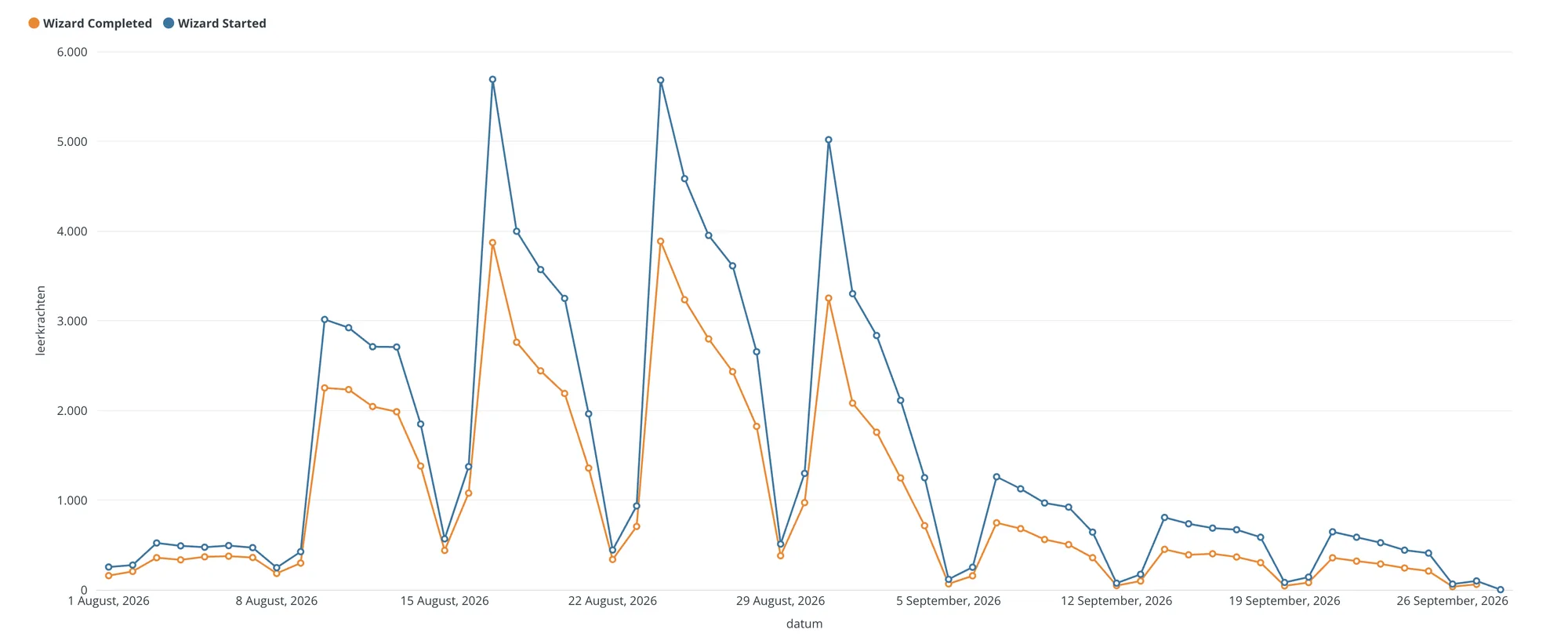
Three peaks, one for each holiday region returning to school. The dips are weekends.
What I learned
- Timing beats persuasion. Asking at the moment teachers are setting things up anyway worked far better than a whole year of optional settings
- Every extra step outside the flow costs completion. More than 2,200 merge requests are still waiting for email confirmation. Confirming in the flow itself, where possible, is worth exploring
- Skipping shouldn't mean missing out. About a third of the teachers didn't finish the flow in those busy first weeks. That's why the next iteration lets them finish later from their Start page
- Linking teachers to a school deserves a place in this flow. A teacher connected to their school gets much more out of Gynzy. There wasn't enough time to ask for all the data we wanted in this flow. Adding a school is already possible elsewhere in the product, but some teachers rarely or never end up there. That's why it belongs in the next version of this onboarding
- Building the components myself gave the team room. Despite a lot of scoping, we delivered more than planned within the time we had. Because I built the components and screens, the developers only had to wire them together, which left them more time to think about how to structure the data and the architecture
Next steps
- Finish later: teachers who skip steps can complete them on their Start page, so a busy first week doesn't mean missing out
- Add your school: a new step where teachers can add their school, closing another gap in our data
Next project